Business + AI Hackathon · Day-of guide
Friday, Sept. 25
- Check-in
- 8 a.m.
- Program
- 9 a.m.–5 p.m.
- Where
- Tech Flex, UCC lower levelUniversity Center Complex (building 39), Stevens Institute of Technology, Hoboken
Page updated Wed, Sept. 23, evening. Check back before you leave.
Friday, Sept. 25
Schedule
At Tech Flex, on the lower level of the UCC.
The partner companies’ challenges are presented, and the judging criteria explained.
Lunch is provided (pizza). Projects are due at 3 p.m.
Five-minute pitch, a live demo (or walkthrough, for system proposals) and a two- to three-minute Q&A with the judges.
Winning teams are announced.
What to bring
Your laptop, fully charged, and its charger. A small power strip, if you have one. Your phone, as a Wi-Fi backup.
On the day
Questions or problems: find an organizer in Tech Flex.
If you registered on your own, we will pair you with a team. How it works will be posted here.
Getting here
Find the UCC
The University Center Complex (UCC) is building 39 on the campus map, on the Frank Sinatra Drive side of campus. Tech Flex is on its lower level.
How are you getting here?
Walk, train, PATH or ferry
From Hoboken Terminal, walk uptown to 6th Street and turn right (east) to campus. From anywhere else in Hoboken, use the walking directions below.
Walking directions to the UCCAt the UCC, follow the photos from the UCC doors
Bus
NJ Transit #126 from Port Authority runs along Washington Street. Get off at 6th Street and walk east to campus.
Walking directions to the UCCAt the UCC, follow the photos from the UCC doors
Rideshare or taxi
Set your drop-off as close to this pin as the app allows. Cars can’t drive onto campus paths, so walk the last part. Avoid “1 Castle Point Terrace”: it is the general campus address, several blocks from the UCC.
UCC on Google MapsAt the UCC, follow the photos from the UCC doors
Car
Park in the Babbio Center Garage. The entrance is on Frank Sinatra Drive. Use the link below instead of typing an address.
Directions to the garageThen follow the photos from the garage
Walking from the garage
At the UCC
Garage to Tech Flex
UCC doors to Tech Flex
Follow the red arrows. Driving: start at step 1. Coming on foot, by train, bus or rideshare: find the doors in step 6, then follow steps 7 to 10.
Follow the red arrows.
Find these doors at the UCC, then follow the red arrows.
-
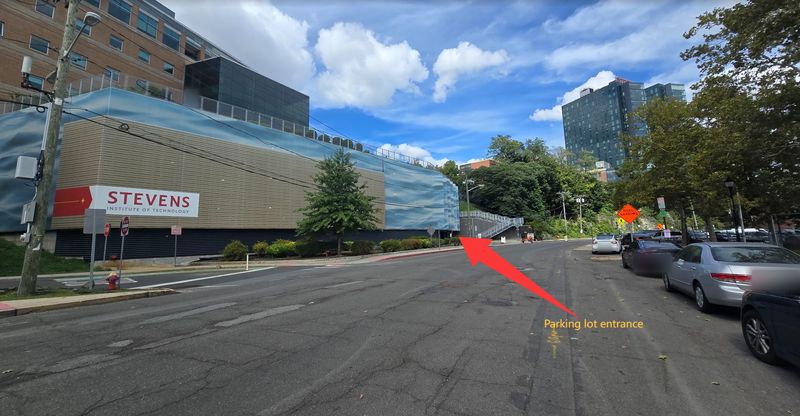
The garage entrance is on Frank Sinatra Drive, at the far end of this building (red arrow).
-
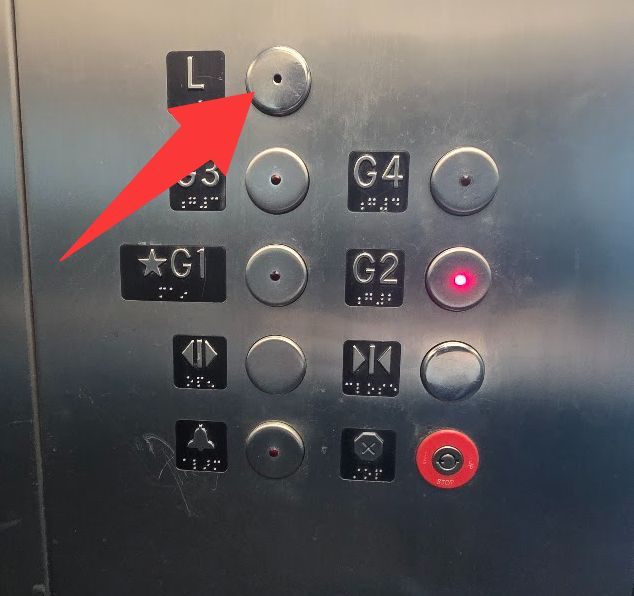
Park, then take the garage elevator to L.
-
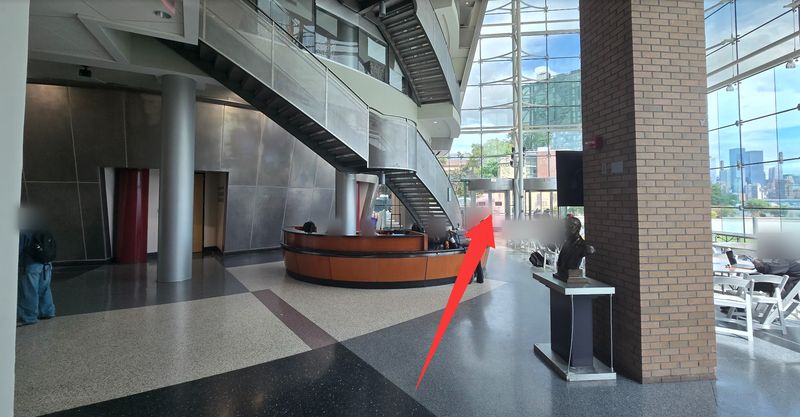
Level L is the Babbio Center lobby. Walk past the front desk to the glass doors.
-
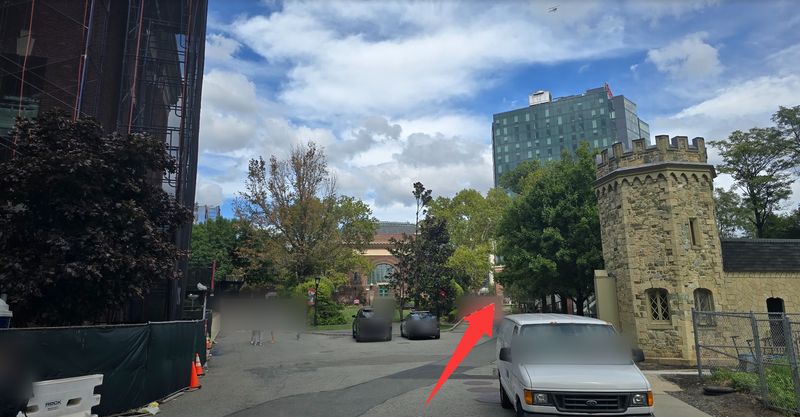
Outside, continue straight onto campus.
-
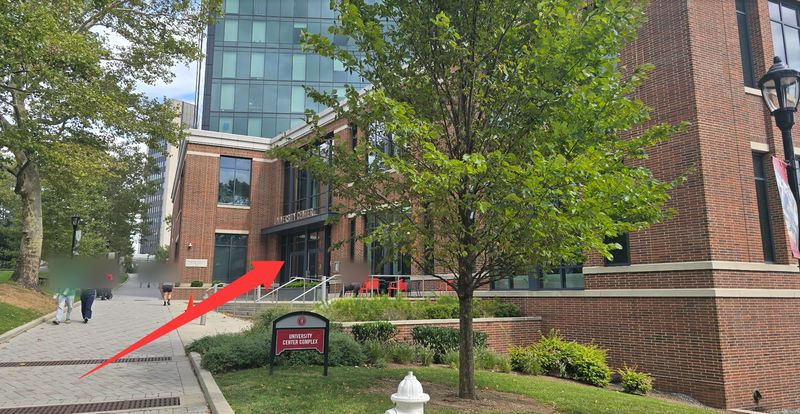
The University Center (UCC) is on your right. Head for its entrance.
-
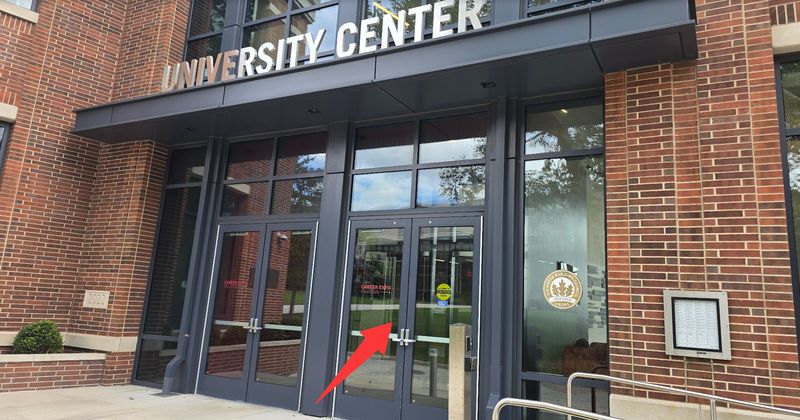
Go in through these doors.
-
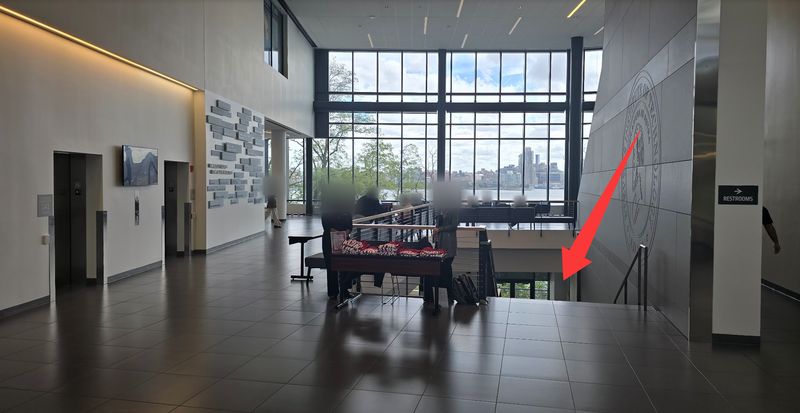
Inside, take the stairs down to the lower level.
-
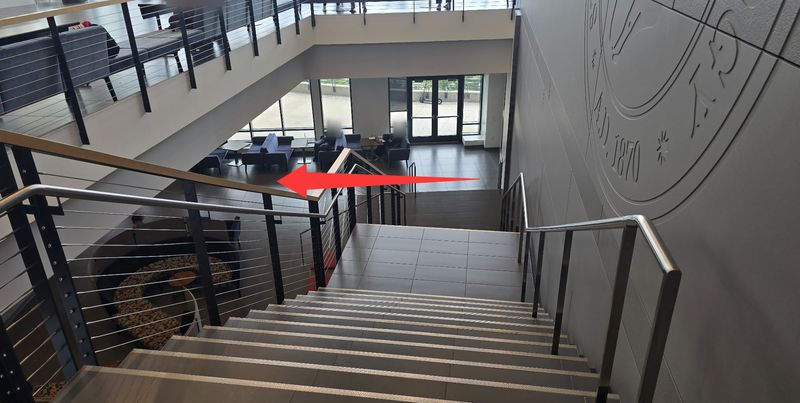
At the bottom of the stairs, turn left.
-
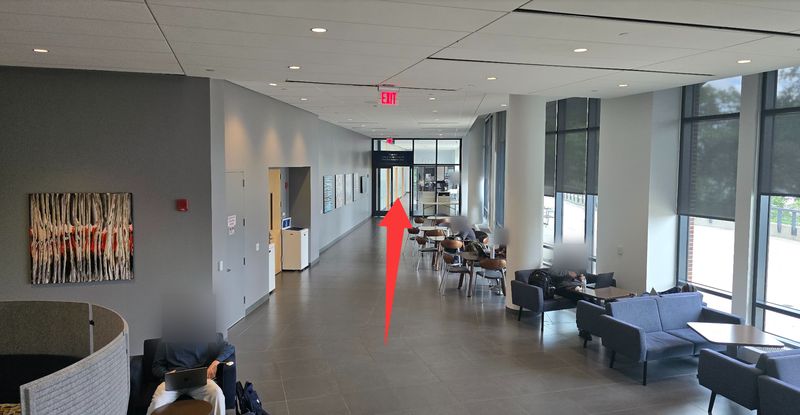
Walk straight down the corridor to the glass doors.
-
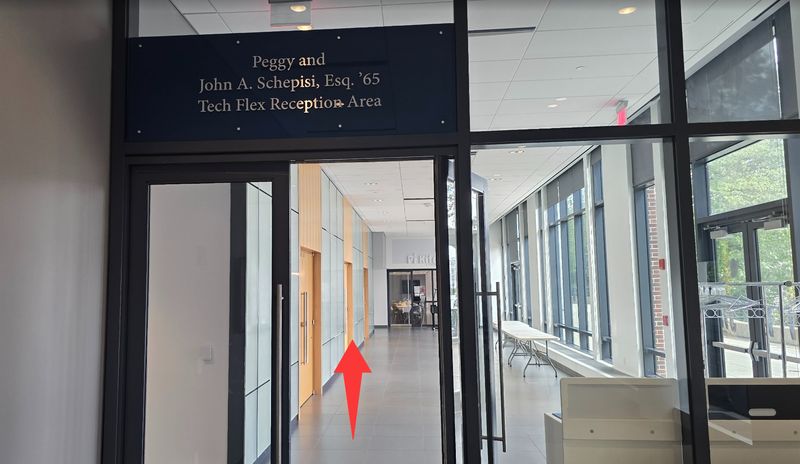
Go through the glass doors into the Tech Flex Reception Area. Tech Flex is the double doors on your left.
For a step-free route inside the UCC, call the UCC Welcome Desk at (201) 216-8993.
Wi-Fi
Getting online
Stevens students
Use Stevens-Net as usual.
Everyone else: Stevens-Guest
- In your Wi-Fi settings, choose Stevens-Guest and press Connect.
- Open a web browser. A “Secure Internet Portal” page appears.
- Enter your first name, last name and email, then press Register.
- When you see “Login Successful”, you are online.
Stevens lists the guest network as “10MB Bandwidth”. Install your tools and download large files before Friday, and keep your phone’s hotspot ready as a backup. If you disconnect, you may need to register again. If your own university uses eduroam and it already works on your laptop, it may connect here too.
Wi-Fi trouble: Stevens IT help desk (TRAC), outside the Library entrance, open 8 a.m. to 7 p.m. Friday, or call 201.380.6599. Stevens’ guest Wi-Fi instructions.
Sponsor perk
One free month of ElevenLabs
Every registered participant gets one month of the ElevenLabs Creator plan ($22 value). Claim it before Friday, so you are not setting up accounts during build time.
How to claim
- Join the ElevenLabs Discord. You need a free Discord account with a verified email.
- Discord may first ask you to accept the server rules or answer a few questions. Then open the coupon-codes channel and click “Start Redemption”. If the button does not respond, wait about 10 minutes and try again.
- Choose “Business + AI Hackathon” and enter the email you registered with.
- The bot sends you a coupon code. Use it on a free ElevenLabs account.
ElevenLabs’ own 27-second walkthrough of the Discord steps.
The bot only knows people who registered by midday Tuesday, Sept. 22. If you registered after that, or the bot does not find you, reply to the hackathon email you received with the address you registered with, and we will help. On Friday, ask an organizer in Tech Flex.
Links
The Hacker Guide has its own “Submit your project” step: that is ElevenLabs’ optional showcase. Hackathon projects are submitted only on our submission page.
Help during the event: the #hackathon-support channel on the ElevenLabs Discord.
ElevenLabs prizes
Overall winning team: three months of ElevenLabs Pro ($297 value) for each team member.
Best Project Built with ElevenLabs: three months of ElevenLabs Scale ($897 value) for each team member.
Using ElevenLabs is optional. If you build with it, tick ElevenLabs under “AI tools you used” when you submit.
Submitting
Due at 3 p.m.
One per team
Pick one teammate to submit. They can submit again as often as they like before 3 p.m., and we use the latest one. Spell your team name the same way each time.
Share links
Share whatever shows your work, in any format: slides, code, a doc, a prototype. Keep it on Google Drive, OneDrive, Dropbox, Canva or GitHub, set sharing to “Anyone with the link” and paste the links into the form.
The submission button appears on the submission page at 6 a.m. on Friday. Send a first version early and update it later. If the form gives you trouble, tell an organizer in Tech Flex before 3 p.m.
Thank you
Our sponsors and partners
Sponsors

Advisors and partners

1435 Capital Management SLLC, a venture firm based in Princeton, New Jersey, advises the organizing team on judging and mentorship. Advisory support is a separate arrangement from sponsorship.